A vacuum cleaner is a helpful tool to keep your home clean. The brush roll is very important. It helps pick up dirt from carpets and floors. But what if the brush roll does not spin? Your vacuum will not clean well. Don’t worry. This guide will show you how to fix a vacuum cleaner brush roll that won’t spin.
What Is a Brush Roll?
The brush roll is a cylinder with bristles. It is found under the vacuum cleaner. When the vacuum is on, the brush roll spins fast. It sweeps dirt and dust into the vacuum. If it stops spinning, the vacuum cannot clean carpets well.
Why Does The Brush Roll Stop Spinning?
There are many reasons why the brush roll won’t spin. Some common causes are:
- Hair and threads stuck: Hair and threads can wrap around the brush roll. This can stop it from moving.
- Belt problems: The belt connects the brush roll to the motor. If the belt breaks or slips, the brush stops spinning.
- Brush roll damage: The brush roll itself can be broken or worn out.
- Motor or electrical issues: Sometimes the motor or wiring has a problem. This stops power to the brush roll.
- Blocked vacuum: If the vacuum is clogged, it can stop the brush roll from spinning properly.
Tools You Need To Fix The Brush Roll
Before starting, gather some simple tools. These will help you fix the brush roll safely.
- A screwdriver (usually Phillips or flat head)
- A pair of scissors or a utility knife
- A pair of tweezers or pliers
- A clean cloth
- Replacement belt (if needed)
Step-by-Step Guide To Fix The Brush Roll
Step 1: Unplug The Vacuum Cleaner
Safety first! Always unplug your vacuum before doing any work. This stops electric shock or injury.
Step 2: Turn The Vacuum Upside Down
Lay the vacuum on a flat surface. Make sure the brush roll is easy to reach.
Step 3: Remove The Bottom Plate
Most vacuums have a plate or cover on the bottom. Use a screwdriver to remove it. Keep the screws safe. You will need them later.
Step 4: Check The Brush Roll
Look closely at the brush roll. Is there hair or string wrapped around it? If yes, remove them carefully.
- Use scissors to cut the hair or thread.
- Use tweezers to pull the pieces out.
- Be gentle to avoid damage.
Step 5: Try To Spin The Brush Roll
Use your hand to spin the brush roll. It should turn easily. If it is stuck, clean it more. Check for dirt or damage.
Step 6: Check The Belt
The belt is a rubber band that moves the brush roll. Look for these problems:
- Broken belt: The belt might be snapped or torn.
- Loose belt: The belt could be stretched and loose.
- Slipped belt: The belt might have slipped off the brush roll or motor.
If the belt is broken or loose, it needs to be replaced.
Step 7: Remove And Replace The Belt
Follow these steps to replace the belt:
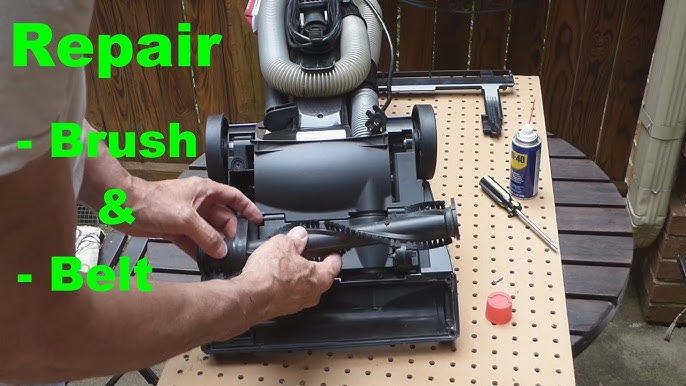
- Remove the brush roll from the vacuum.
- Take off the old belt from the motor and brush roll.
- Put the new belt on the motor shaft.
- Slide the brush roll back in place, over the belt.
- Make sure the belt is tight and properly aligned.
Step 8: Clean The Brush Roll And Vacuum Base
Use a cloth to clean dirt and dust. Clean inside the vacuum base where the brush roll sits. This helps it spin better.
Step 9: Check For Blockages
Look inside the vacuum hose and nozzle. Remove any blockages. A blocked vacuum can stop the brush roll from working.
Step 10: Put The Vacuum Back Together
Screw the bottom plate back on. Make sure everything fits well.
Step 11: Test The Vacuum Cleaner
Plug the vacuum in and turn it on. Check if the brush roll spins. If it spins, you fixed the problem!
When To Ask For Help
Sometimes, the brush roll still will not spin. This may mean a motor or electrical problem. These are hard to fix at home.
If you feel unsure, ask a vacuum repair expert. They have the right tools and knowledge.
Tips To Keep Your Brush Roll Working Well
- Clean the brush roll often to remove hair and dirt.
- Check the belt regularly for wear and tear.
- Avoid vacuuming large pieces of debris that can jam the brush roll.
- Empty the vacuum bag or bin when full.
- Store your vacuum in a dry place to avoid damage.
Summary Table: Common Problems and Fixes
| Problem | Cause | Fix |
|---|---|---|
| Brush roll won’t spin | Hair and threads wrapped around brush | Cut and remove hair or threads |
| Brush roll stuck or hard to spin | Dirt or debris inside brush roll ends | Clean brush roll and ends |
| Brush roll spins slowly or not at all | Broken or loose belt | Replace the belt |
| Brush roll does not spin, no belt issue | Motor or wiring problems | Call a repair technician |
| Vacuum suction weak | Vacuum hose or nozzle blocked | Clear all blockages |
Final Thoughts
Fixing a brush roll that won’t spin is easy if you follow these steps. Most problems come from hair, dirt, or a broken belt. With simple tools, you can clean or replace parts yourself. This saves money and keeps your vacuum working well.
Always stay safe and unplug the vacuum before starting. And if something feels too hard, ask for help. Keeping your vacuum brush roll clean helps your home stay fresh and tidy.
Frequently Asked Questions
Why Won’t My Vacuum Brush Roll Spin Properly?
A stuck brush roll usually means hair or debris wrapped around it. Clean the roll and check for blockages. Also, check if the belt is broken or loose.
How Do I Clean A Vacuum Brush Roll Correctly?
Remove the brush roll from the vacuum first. Use scissors or your fingers to cut and pull out tangled hair. Wipe it with a damp cloth for better cleaning.
Can A Broken Belt Stop The Brush Roll From Spinning?
Yes, a broken or loose belt stops the brush roll from moving. Replace the belt with the exact size for your vacuum model. This usually fixes the spinning problem.
How Often Should I Clean My Vacuum Brush Roll?
Clean the brush roll at least once a month. If you have pets, clean it more often. Regular cleaning keeps it spinning and working well.